My new project, Tamabotchi!
March 01 2026 - 10 Minutes - Source
java - discord - jda
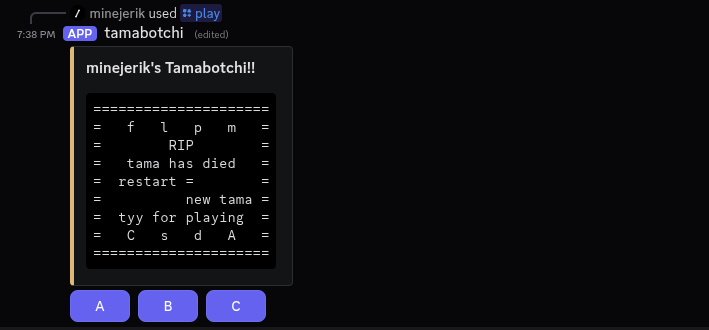
A screenshot from Tamabotchi
Hello everyone! I'm back again with a new blog post!
This time I made a discord bot, that lets you play a Tamagotchi clone thru discord.
First I'll give a quick overview of how everything functions from the user side, and then go more into the details about the bot and how it was developed.
Quick Overview
So the bot works through a message that is updated whenever the user interacts with it, seen above. The user can get another message like that if they run /play again after starting a game, otherwise it will just start another game for the user.
In the background, every hour a small alert function is ran to determine whether or not something of note happened, if an alert was triggered, say by the creature losing all of its hearts in one stat, a dm is sent to the user, alerting them that something changed.
The Details/Development of the Bot
First thing that I made was the actual Tamagotchi clone, I decided to write it in Java, because I am currently taking a Java class at a local community college, and wanted to practice it. (I also just like Java :3)
What I did, was I create an abstract class called Display which has control over a Game object.
Each class that implements Display has some requirements, it has to be able to take input from a user, and then display the current state of the game. The state of the game is calculated inside the instance of the Game class each Display has.
Currently, there are only two displays, TextDisplay and BotDisplay.
TextDisplay uses the CLI to get input, and display results from the game.
BotDisplay is similar, but is used by the discord bot to handle the input and get the results to show.
All the menus, are handled by TextDisplayArt, which is used by both Display types. This takes in the current state of the game, and outputs the actual text result shown.
Little Detail about the Main Menu
The main menu, because of all its complexity is actually dynamically generated by a method in TextDisplayArt that uses the current game state to determine what is shown.
When I first started working on the game, before making it dynamic, I started to manually create each display before I realized how long it would take for every possible main menu state :)
Before we get to the actual discord bot part of the code, I have been speaking a lot about 'Game State', How is that sent between Display and Game?
There is one main record, GameState.
Which contains 3 things:
- int currentSelected - The currently selected icon from the top or bottom bars
- CurrentMenu currentMenu - An enum that contains the currently open menu
- MenuState menuState - Another record that contaisn the current "menu state", this will be explained more.
So lets get started,currentSelected is just the currently selected icon, starting from the top at 0, and 6, as 7 is the icon for alert, which can't be selected, but is an icon nonetheless. This is used for the bars, and which changes the selected menu icon to a capital letter
currentMenu is an enum, called CurrentMenu. It is the currently opened menu, this is used for the actual menu part of the menu. It has these options, used in the rendering:
MAIN- The main menuCLOCK- Would've been the clock menu, was never implementedFOOD- The food/eating menu, lets you feed the creatureLIGHT- The light menu, lets you turn on and off the lightGAME- The game menu, lets you play a game with the creature, to increase happinessMEDICINE- The medicine menu, lets you cure the creature of illness when it is sickCLEAN- The clean menu, lets you clean the creature when it poopsSCALE- The scale menu, lets you see the stats of the creatureSCOLD- The scold menu, lets you scold the creature when it misbehavesDEAD- The death menu, shown at the top in the screenshot, what happens when the creature dies
It also has VALUES, which contains CurrentMenu.values(), which is used when swapping the menu, when an icon is pressed.
So, now its time for the MenuState record, which contains many things, that I will go through in order.
First thing's first, MenuStateEnum menuStateEnum, which contains the broad state, the rest of the record is used to "narrow in" the menu state.
These are seen here:
NEUTRAL- Just the neutral state, used for just the main menuFOOD_BURGER- In the food menu, used for when you select the burgerFOOD_SNACK- In the food menu, used for when you select the snackLIGHT_ON- In the light menu, when the light is selected to be onLIGHT_OFF- In the light menu, when the light is selected to be offGAME_NEUTRAL- In the game menu, when there is no ending or reactionGAME_CELEBRATE- In the game menu, when the creature celebrates after winning a roundGAME_SAD- In the game menu, when the creature is sad after losing a roundGAME_WIN- In the game menu, when the creature is happy after winning the gameGAME_LOSS- In the game menu, when the creature is sad after losing the gameMEDICINE_NEUTRAL- In the medicine menu, when the shot isn't selectedMEDICINE_SHOT- In the medicine menu, when the shot is selectedCLEAN_NEUTRAL- In the clean menu, when the duck isn't selectedCLEAN_DUCK- In the clean menu, when the duck is selectedSCALE_NORMAL- In the scale menu, when on the normal screen, showing the creature's ageSCALE_DISCIPLINE- In the scale menu, when showing the creature's disciplineSCALE_HUNGER- In the scale menu, when showing the creature's hungerSCALE_HAPPY- In the scale menu, when showing the creature's happinessSCOLD_NEUTRAL- In the scold menu, when the scold option isn't selectedSCOLD_SCOLD- In the scold menu, when the scold option is selected
The next value is boolean alert, which is just if the alert is currently active or not.
The next two are, boolean eating and boolean decliningToEat, which are used to deal with the creature eating or not. Used during the main menu, which shows if the creature has eaten, or isn't hungry and is declining the food, it speaks in either of these states.
The next is, boolean lightOn, which is used to show if the light is on or not, if it is off, it doesn't draw the main part of the main menu.
boolean sleeping, If the creature is sleeping or not, if it is sleeping, it speaks that it is, and blocks the opening of menus.
int gameNum1, int gameNum2, byte gameCount, boolean gameShow, int gameWinCount, These are all used in the game menu.
The two gameNum variables are used for the two numbers of the game, the gameCount is just the count of the current round, out of 5
gameShow is used to show the hidden number that is shown at the end of each round, after the guess.
gameWinCount is just the amount of rounds won by the user, out of 5, if this reaches 3 they win.
The next three are, boolean poop, boolean sick, boolean medicated, boolean refusingMediciation, boolean cleaned Which all determine what is being shown, They all show something for the main character.
poop and sick show either of the two ailments for the creature
medicated and refusingMediciation if the medicine worked or not, fixes the sickness, by the creature speaking.
cleaned shows if the poop is cleaned, also by the creature speaking.
Next is Stats stats, which is a Stats record, that contains the hunger, happiness, discipline, and age of the creature, used in the scale menu.
Finally, is boolean scolded, which shows if the creature was scolded, by the creature speaking.
finally done with the game stateee, it's time for the:
Discord Bot
The discord bot is made using JDA, The Java Discord API.
Whenever a user runs /play, it checks in a hashmap of User and BotDisplay, to see if a game for that user exists already, if it does, it prints the current state of the game as a new message.
If a game doesn't exist for that user, it creates a new one, and adds it to the hashmap.
The actual game menu was made using embeds and message compoments. Using JDA this wasn't that difficult.
pretty simple, huh?
Conclusions and Reflection
During the creation of this, I learned a lot about Java, JDA, and discord bots in general.
I have made some discord bots in the past, using pycord and Python, but now that I have used JDA, I may make any more bots I make in Java, as I really enjoyed using JDA and just Java in general.
In hindsite, I should've put more work in shrinking the MenuState record especially, I should've used another enum for the main menu states, just for clarities sake, but it did work, despite how messy it was.
If you are interested in messing with the bot, I will host it for a while, it can be added to your server here.
I tried getting it on top.gg, but it ended up being removed during the review without an explanation given, I may try and get it on another website.
And in some unrelated news, have been making this website more indieweb compliant, and have created an email for this site specifically, minejerik{at}minejerik.dev.
Thank you for reading!!!